
Day: power, loot and sell
Start the RV generator, open Dark Market on the laptop, then scavenge and mine while daylight lasts. Use the yellow SELL box beside the RV door to sell your haul before sunset.
Cash arrives the next in-game morning.

First-run guide
A successful first run follows five moves: start the RV generator, open Dark Market on the laptop, scavenge and mine sellable resources, collect the Cash payout the next morning, and save your Air Horn charges for the monster after sunset. Repay the debt, then prepare for the separate Final Hunt objective.
Start with step 1First run at a glance
Start the RV generator, open Dark Market on the laptop, then scavenge and mine while daylight lasts. Use the yellow SELL box beside the RV door to sell your haul before sunset.
Cash arrives the next in-game morning.
The monster starts hunting at sunset. Watch its field of view, keep an escape line open, and use an Air Horn charge to create space when the chase closes in.
The checked tutorial build gives the Air Horn 3 uses; it deters the monster briefly, not permanently.
In Debt Hunt, Cash from sold items does not immediately credit to your balance after deposit. The tutorial says sold-item Cash arrives the next in-game morning. Use Day Results to read the sale list and balance before your next shopping trip.
Van Panel controls
Skip Phase advances the current phase. In Rogurt's gameplay, skipping at night brings up Day Results, accounts for sold items, and moves the team into the next morning. The results still show the outstanding debt and the days left to repay it.
Consider a night skip once your team has finished selling and is ready for the next morning. Agree with teammates first: advancing the phase can cut short what someone is still doing. Keep the remaining debt and day counter in view when deciding whether to move on.
A phase skip still leaves you with the run’s remaining jobs. In notxeri_’s night skip at 12:10, the results show two injured players and two days left to clear the debt. Check the team status as well as the clock before heading out again.
Rogurt, August 29: Van Panel 2:16 · vote 4:05 · Day Results 4:10. These clips show PC multiplayer before Update 0.85; use your on-screen prompt for the controls in your session.
Pick up Gasoline and equip it. Aim at the generator’s fuel inlet until Refuel with Gasoline appears, add fuel, then use the switch on the front. Once the switch is green, go to the laptop inside the RV and open Dark Market. The 5 L shown on a can is its fuel capacity.
Use daylight to collect sellable items and return with enough time to prepare for sunset. The Pickaxe breaks stone and minerals. If you find a PAPER CODE, read its four digits and look for the supply crate it describes; opening the box can give you another tool to carry home.
Carry a sellable item to the yellow SELL box beside the RV door. Aim at the box and use the sell prompt. The tutorial says Cash arrives the next in-game morning. On Day Results, check the sold-item list, BALANCE, and the remaining debt days before deciding what to buy next.
The monster begins hunting after sunset. Published values list a 180° field of view on Easy and Normal, 200° on Hard, and 230° on Insane. In the checked tutorial build, the Air Horn has three uses and briefly drives the monster back. Use that opening to move: it is a temporary deterrent, not a stun.
If you trip during a chase, follow the recovery prompt immediately. In the checked PC footage, pressing Space restored movement; on other devices, use the control shown on screen. Once upright, move toward open ground.
Your first RV job
There are two interactions: the fuel inlet on top and the power switch on the front.
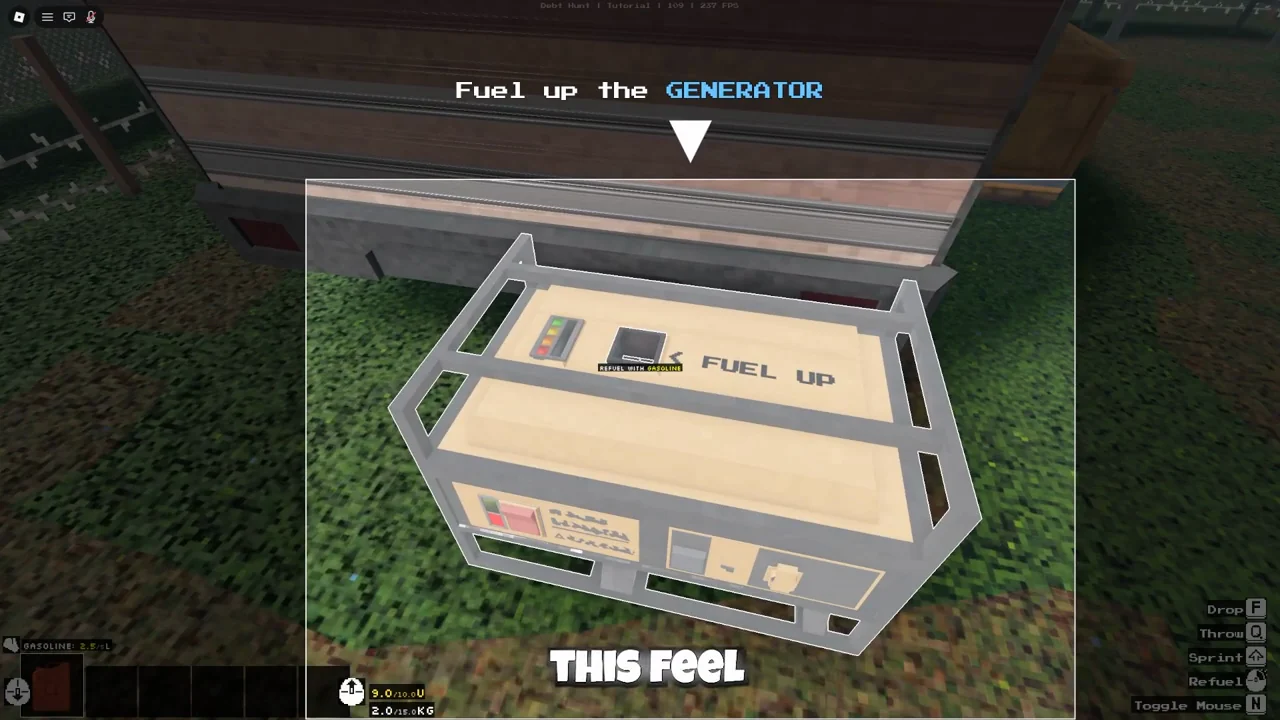
With Gasoline equipped, aim at the fuel inlet on top of the generator.
ItsChalls · 1:14 ↗Video published Aug 31, 2026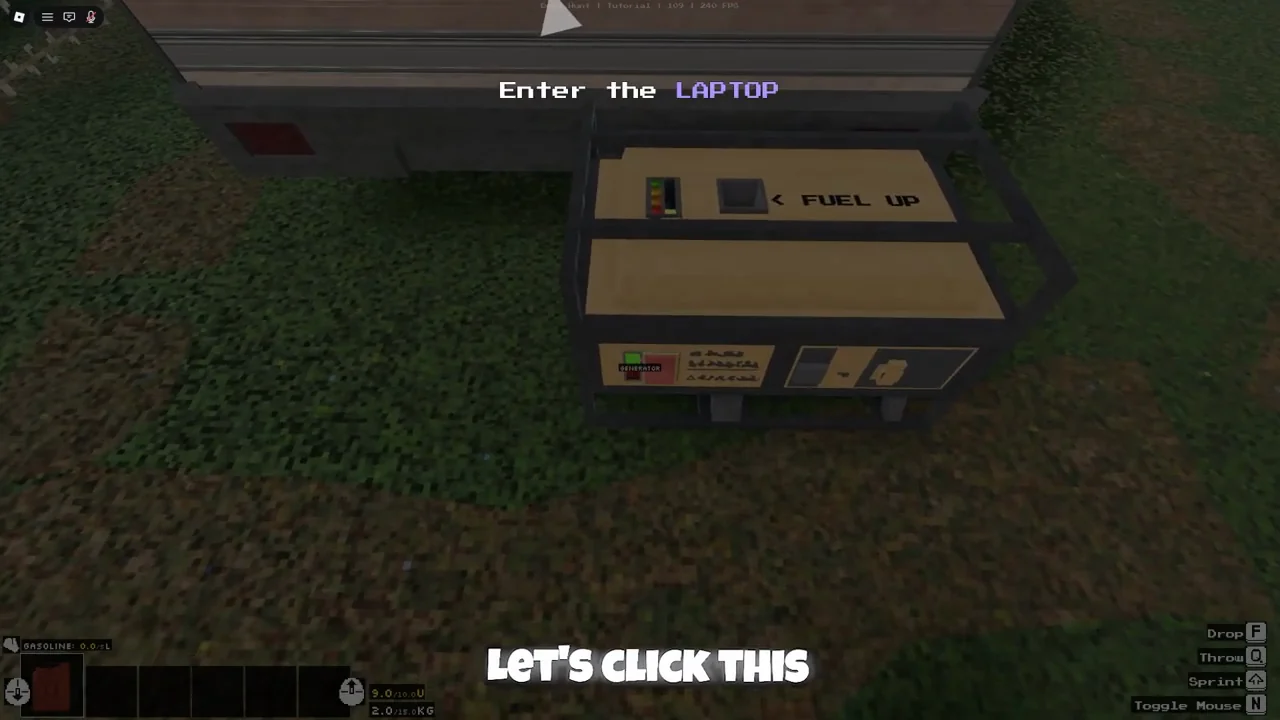
After refueling, use the front switch. The green light marks the next step: the laptop.
ItsChalls · 1:26 ↗Video published Aug 31, 2026Keeping the laptop available helps with shopping and team recovery. The Accumulator and laptop notes explain the backup battery and the different tabs.
Bring the haul home
Use the selling interaction while holding the item. The next-morning screen is where you review the run’s progress.
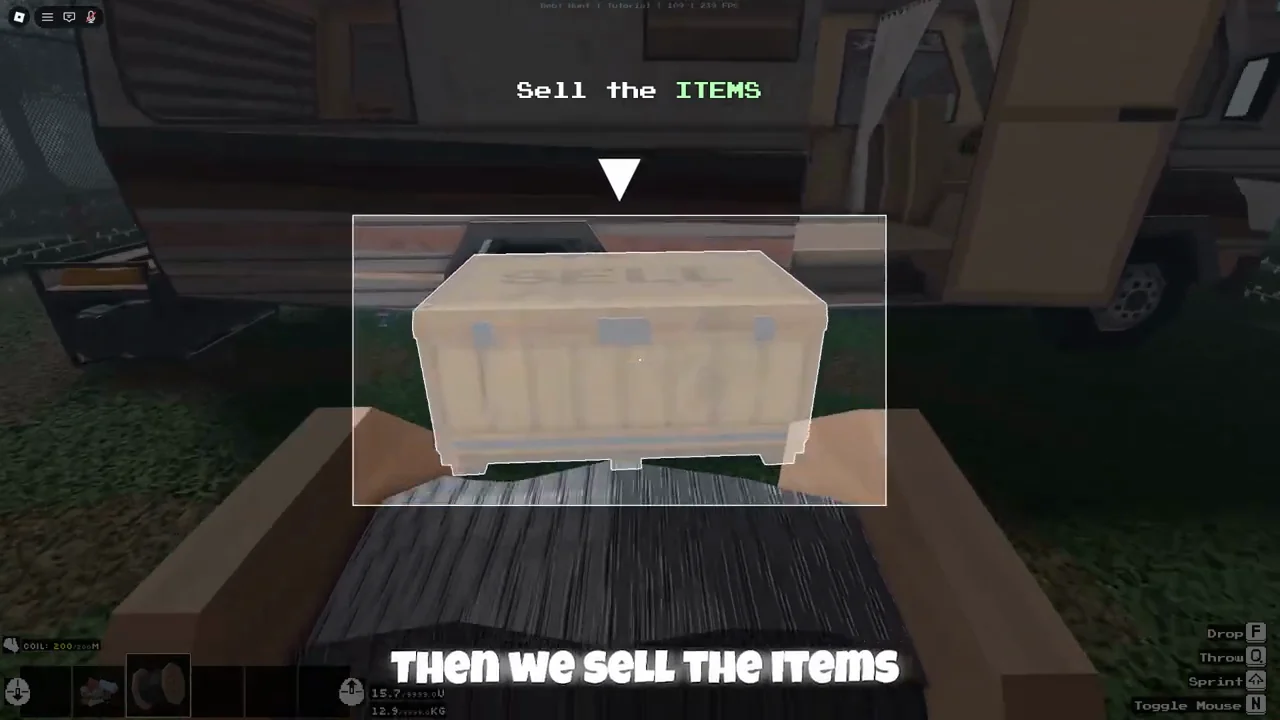
Bring the item to the yellow SELL box beside the RV door and use the sell interaction.
ItsChalls · 3:19 ↗Video published Aug 31, 2026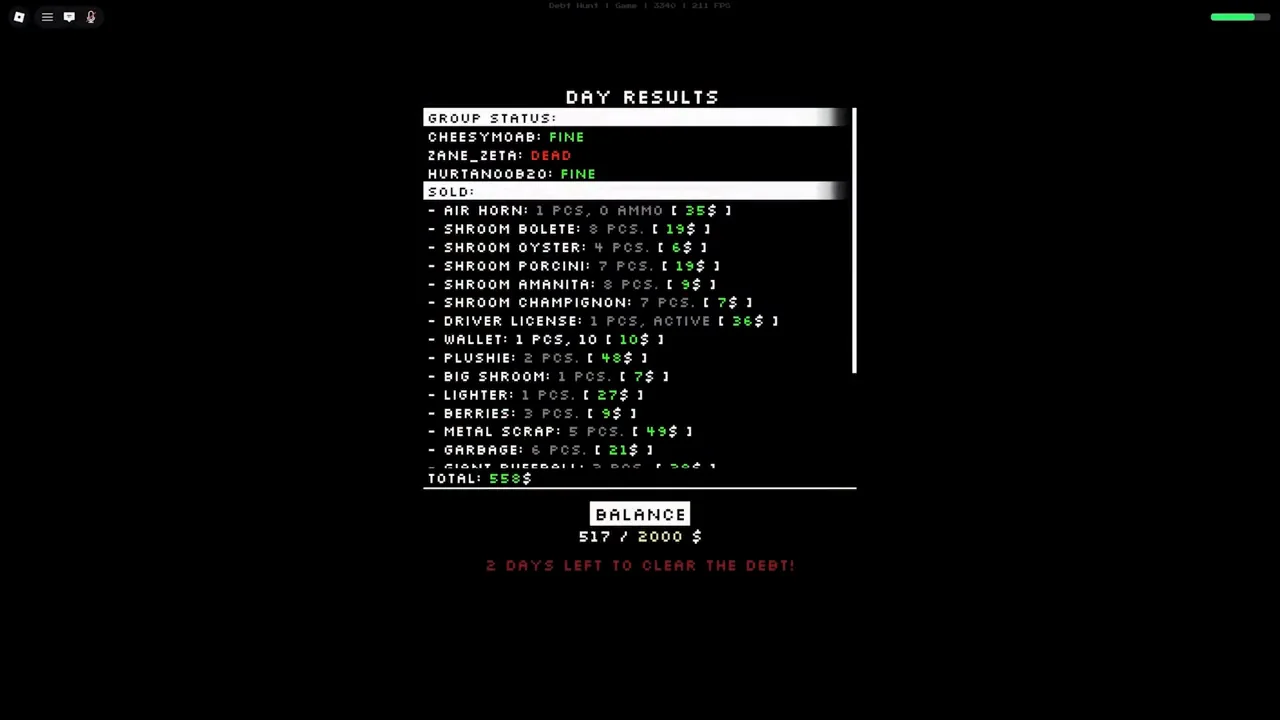
Read the sold-item list, then BALANCE and the remaining debt days. TOTAL and BALANCE are separate fields.
Rogurt · 7:12 ↗Video published Aug 29, 2026In the tutorial, a coil is held in front of the yellow SELL box beside the RV door. After the interaction, the box opens and the player’s hand is empty. Cash from selling items arrives the next in-game morning, so an unchanged wallet immediately after selling is expected.
| Field | What to check before leaving the screen |
|---|---|
| Sold items | Look for the item names, quantities, and listed values from the sale. |
| TOTAL | This is the total shown under the sale list. Rogurt’s example reads 558. |
| BALANCE | Read the separate balance and goal. The same screen shows 517 / 2000, so use this field to check debt progress. |
| Days left | Check the red line below BALANCE. The example has two days left to clear the debt. |
| Group status | Check who is fine, injured, or dead before planning the next trip. |
If your team uses Skip Phase at night, read these same fields after the transition. Once the objective changes from clearing debt to hunting the wolf, continue with the Final Hunt walkthrough.
Same item, different target
The interaction changes when you aim at a different object. Read the prompt before tapping.
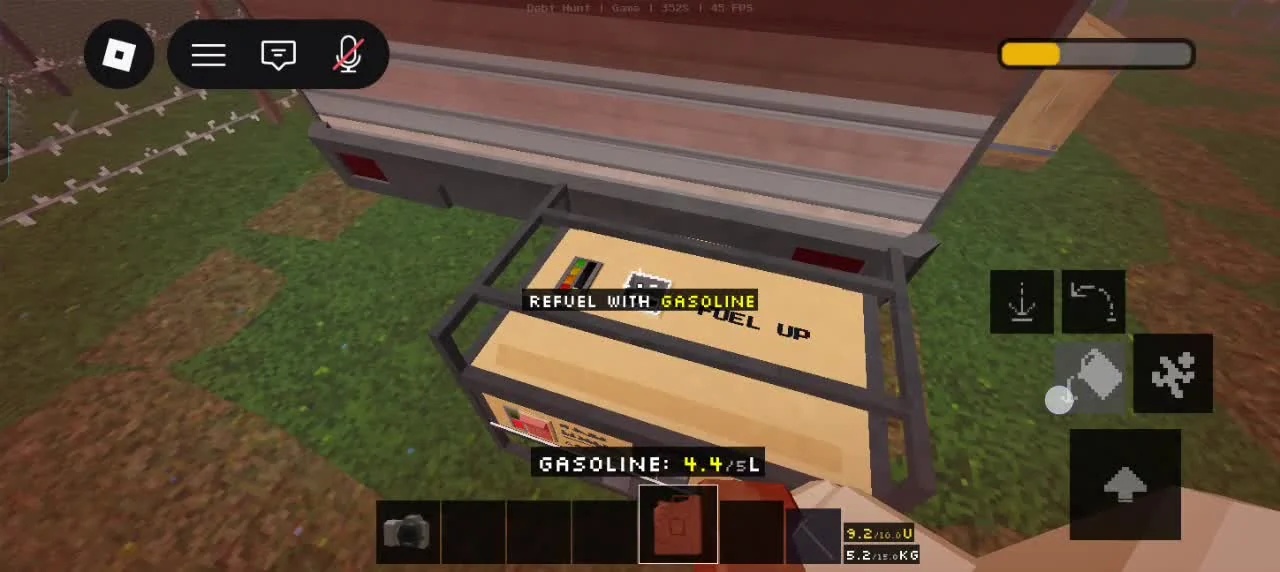
At the generator, the mobile prompt says Refuel with Gasoline and shows the fuel-can action.
airocat · 26:55 ↗Video published Aug 31, 2026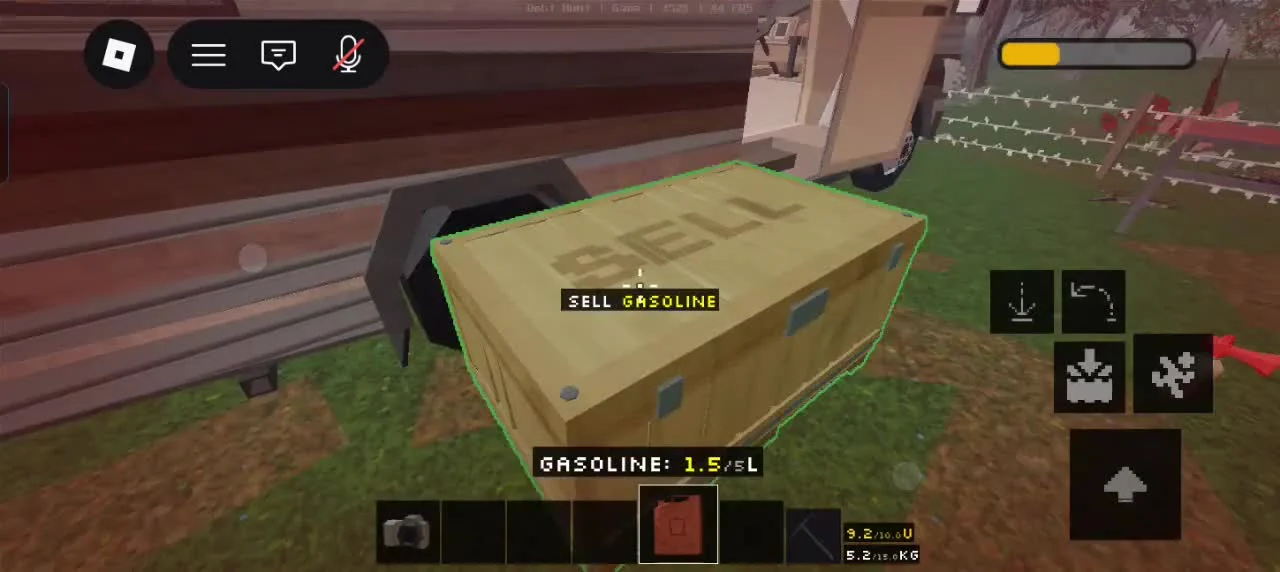
Aim at the yellow box and the same held can gets a Sell Gasoline prompt. Check the target before tapping.
airocat · 27:00 ↗Video published Aug 31, 2026With Gasoline selected, aim at the generator to get Refuel with Gasoline. Aim at the yellow selling box and the prompt becomes Sell Gasoline. Move your aim back to the generator if you meant to refill it.
On PC, the recorded item HUD lists F for Drop, Q for Throw, and N for Toggle Mouse. Mobile uses the visible action icons. Let the label on the current target guide the interaction.
Night-run visual field notes
Use the shop’s item descriptions to prepare, then open MedHelp when a teammate needs recovery.
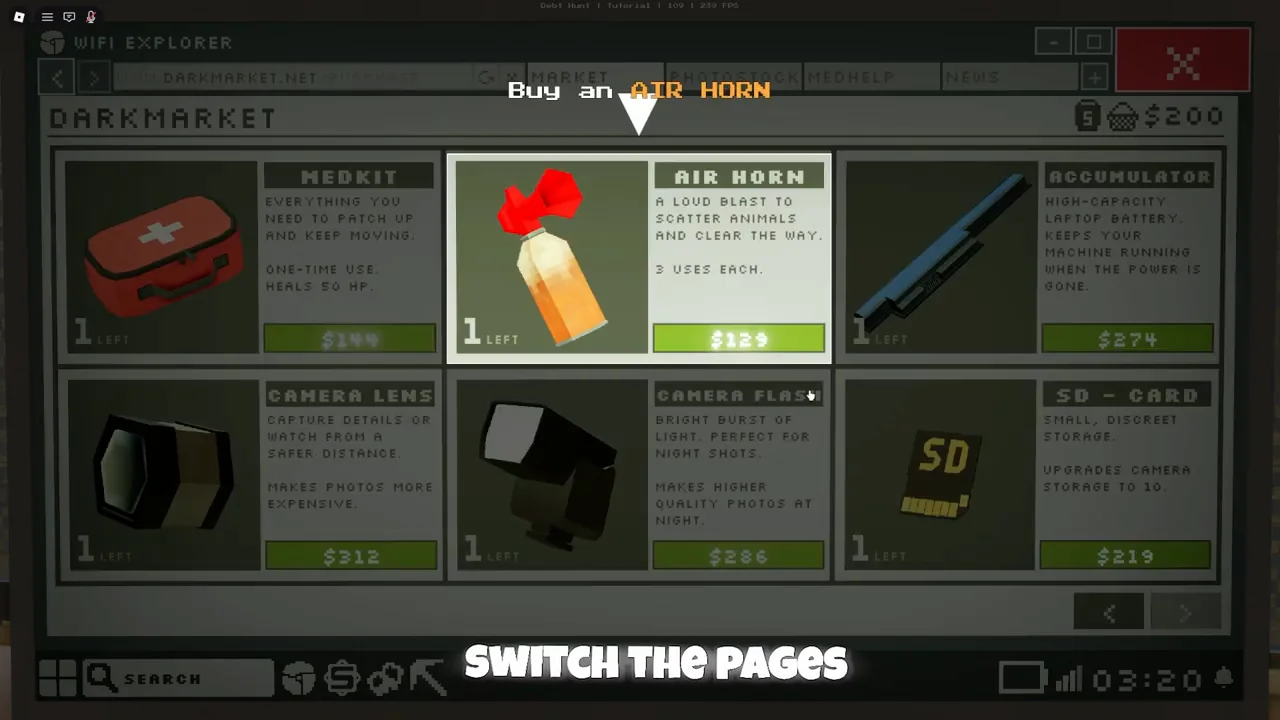
Read the item card before buying: the Air Horn says 3 uses each; the Medkit restores 50 HP.
ItsChalls · 1:44 ↗Video published Aug 31, 2026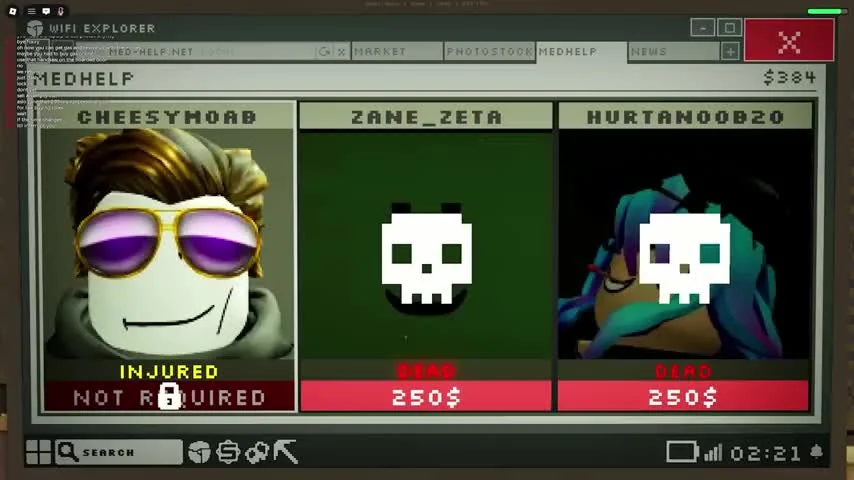
MedHelp separates INJURED from DEAD. The recorded dead-player cards offer a revive purchase.
Rogurt · 17:01 ↗Video published Aug 29, 2026A Medkit restores 50 HP as a one-use item. MedHelp has the revive purchase for dead teammates. The Air Horn card says 3 uses each; save a charge for a chase when you need room to move.
Daylight is your earning window: power the RV, collect resources, sell items, and prepare an escape tool. At sunset the monster starts hunting. Roblox currently labels the experience [REVERT], so the lobby may differ from the Update 1 tutorial while the debt-and-sunset loop stays the same.
Wait for the next in-game morning and check the Cash balance again. The sale payout is delayed by design in the tutorial flow, so an unchanged balance during the same day does not mean the items were lost.
For a laptop without power, check the generator’s fuel and switch first. The Accumulator is a separate battery item whose card says it keeps the laptop running when power goes out. Update 0.85 restored the previous lobby and fixed several laptop and Dark Market delivery problems.
Sold-item Cash arrives the next morning. Do not spend the rest of the day waiting beside the selling point.
The tutorial build gives each Air Horn three uses. Save charges for a chase or a blocked escape route.
Turn back before the monster activates. A smaller haul that reaches the RV is worth more than a full inventory lost in the dark.
Start the RV generator, use the powered laptop to open Dark Market, then begin a short daylight scavenging route.
The tutorial says Cash from sold items arrives the next in-game morning, not immediately after the sale.
Prepare before sunset, avoid the monster's front field of view, keep moving through open ground, and use one of the Air Horn's three charges when you need space.
The Pickaxe item card says it breaks stone and minerals. Use it when your daylight route includes Mineral Ores.
Skip Phase advances the current phase. In the recorded night-skip sequence, it leads to Day Results and the next morning. Open the Van Panel at the front of the RV and select Skip Phase; the PC multiplayer prompt shows Accept [F1] and Deny [F2]. Check the remaining days and your teammates’ status after the transition.
Next progression step
Once you master daylight resource gathering and sunset monster avoidance, choose your next gameplay focus:
Cleared the required cash quota? Discover how to trigger the timed ending and eliminate the detected threat.
Open Final Hunt Walkthrough →Track All 21 Official Badges →Monitor requirements for Master Miner (500 Ores), Provision Master (150 Boxes), and all difficulty victories.
Open Badge Tracker →